Welcome to BeDevs! Whether you're an internal recruiter, external recruiter, or a company founder looking to hire tech talent, this guide will walk you through everything you need to know to get started on our platform.
What Makes BeDevs Different
BeDevs is specifically designed for the tech industry, connecting skilled developers, cybersecurity experts, digital marketers, and other tech professionals with companies that need their expertise. Our platform supports both permanent positions and freelance opportunities, giving you flexibility in how you hire.
Your First Steps
1. Create Your Account
Start by signing up at BeDevs by email or with a Google account. During the onboarding process, you'll be asked to identify yourself as a recruiter, which unlocks all the recruiting features you'll need.
2. Set Up Your Recruiter Profile
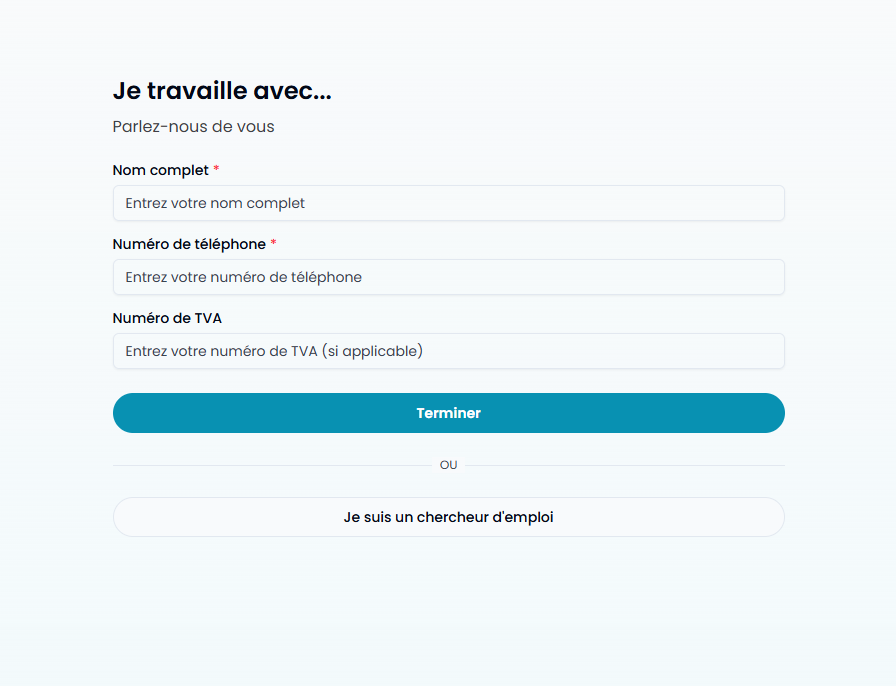
After creating your account, you'll need to complete your professional profile. This helps candidates understand who they're potentially working with and builds trust. Here's what you'll need to provide:
- Full Name: Your professional name as it should appear to candidates
- Phone Number: Required for direct communication with potential hires
- Professional Location: Where you're based (helps with local recruiting)
- Professional Links: Add your LinkedIn profile, personal website, or portfolio
- VAT Number: If applicable. (This allows us to verify your profile and make the platform a safe space for everybody)
3. Understanding Organizations vs Personal Recruiting
This is where many new users get confused, so let's clear it up:
When you join the platform as a recruiter, you can either get invited to an organization or create (in other words, claim) your organization. Whether it's a personal organization or a company.
Because of this, multiple types of recruiters can be found on Bedevs, like:
Internal Recruiters: You'll typically create or join a company's organization profile.
For External Recruiters: You might work with multiple organizations, representing different clients.
For Company Founders: You'll create your company's organization and usually hold the "Owner" role.
As mentionned, you can with one account be an internal recruiter for an organization and at the same time be the owner of your own organization if you want to proceed with recruitments yourself too. There is currently no limit to the number of organization you can be member/owner of.
4. Creating or Joining an Organization
You have two options:
Option A: Create a New Organization
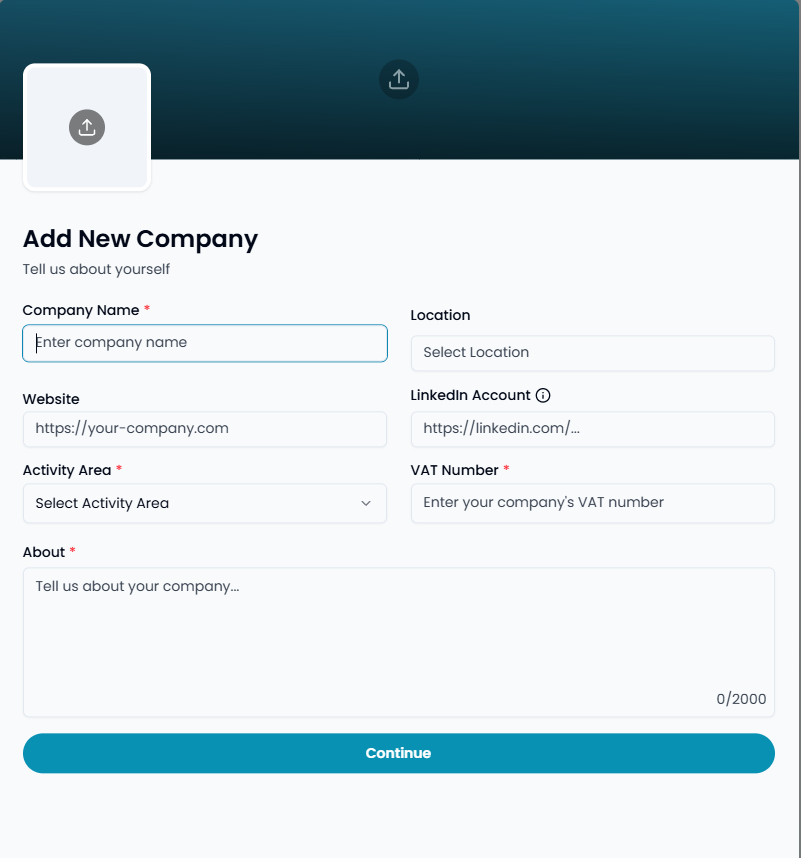
If your company isn't on BeDevs yet, you'll create a new organization:
- Company Name: The official business name
- Location: Where your company is based (if applicable)
- Activity Area: Choose from sectors like "Telecommunications, ICT & web", "Consulting", "Banking, financial services & insurance", etc.
- About: Describe your company, culture, and what makes it a great place to work
- Company Logo & Banner: Visual branding that appears on job posts
- VAT Number: Your company's official VAT registration number
- Social Links: Company website, LinkedIn page, Twitter account
Important: New organizations go through a verification process that typically takes one to a few hours. You won't be able to post jobs until verification is complete, but no worries, we will send you an email when the verification is done.
Option B: Join an Existing Organization
If your company is already on BeDevs, you'll need to:
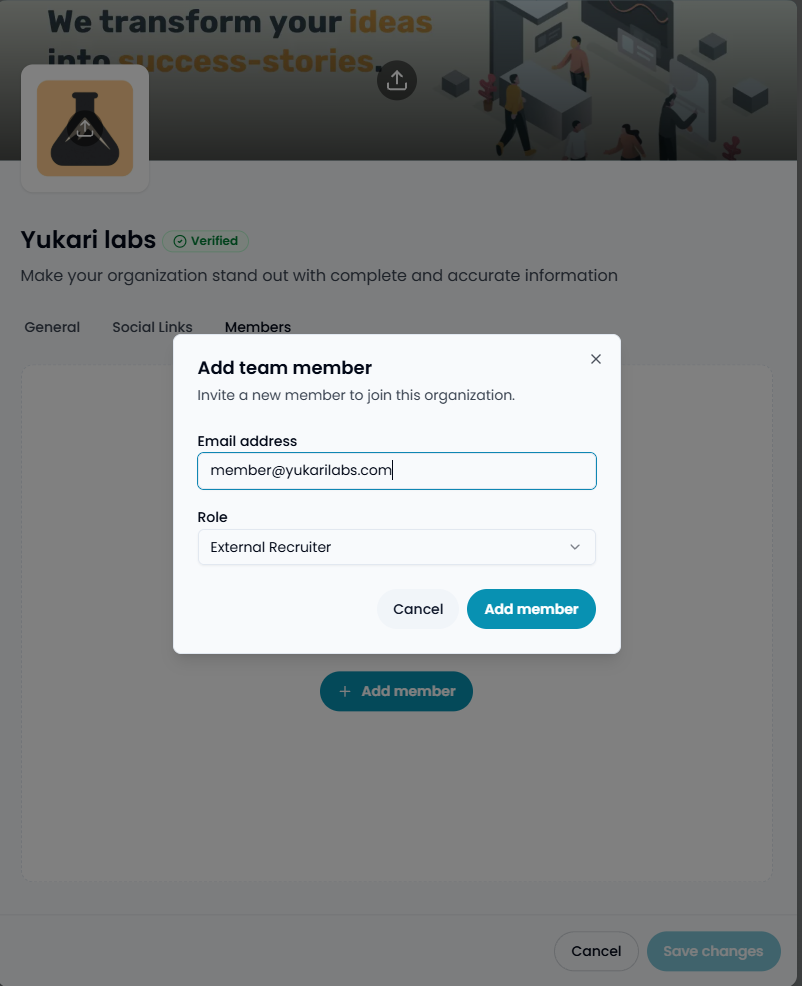
- Ask the company owner or an admin to invite you.
- You will get notified when you are granted access to the organization.
5. Understanding Organization Roles
Each organization member has a specific role that determines their permissions:
- Owner: Full control over the organization, can add/remove members, and manage all job posts
- Administrator: Can manage job posts, invite members, and handle most organization tasks
- Internal Recruiter: Can post and manage job posts for the organization
- External Recruiter: Similar to internal recruiter but marked as external
- Other: Custom roles for specific situations (Still early stage)
Posting Your First Job
Once your organization is verified, you're ready to post your first job opportunity. Here's what makes a successful job post on BeDevs:
Essential Job Information
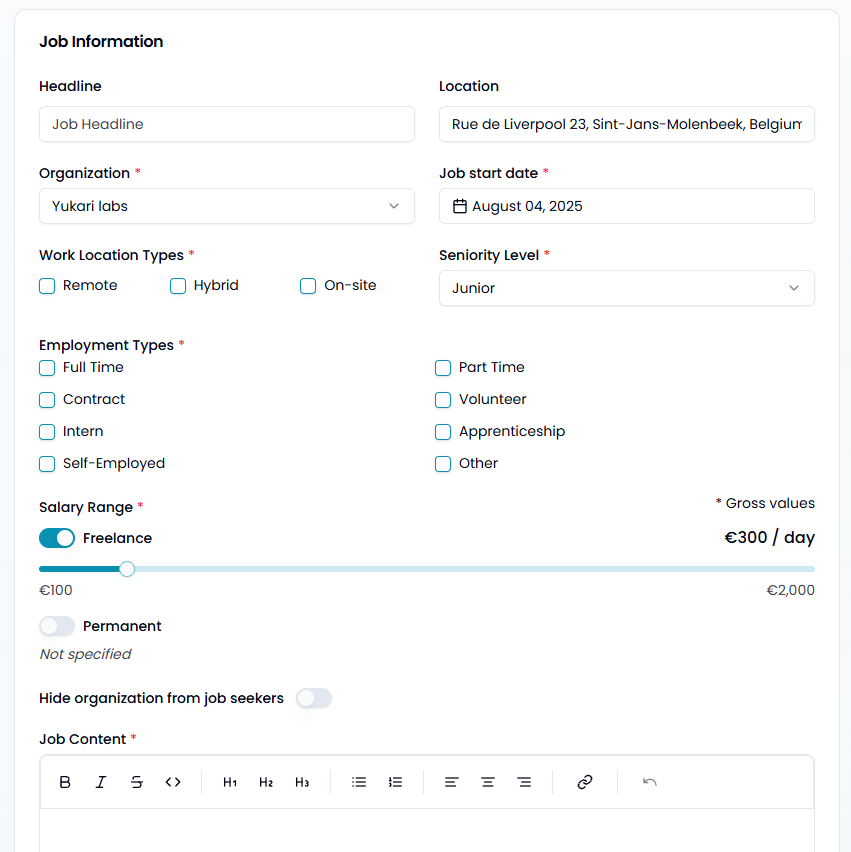
- Headline: Make it specific and appealing (e.g., "Senior Full-Stack Developer - React & Node.js")
- Job Content: Detailed description using our rich text editor to explain the role, responsibilities, and company culture
- Short Description: A compelling 10-150 character summary that appears in search results. Pro Tip: You can use our AI to generate it based on the Job Content if you gave it enough information.
- Location: Where the job is based
- Work Location Types: Remote, Hybrid, or On-site (you can select multiple options)
- Employment Types: Full Time, Part Time, Contract, Freelance, etc. (you can select multiple options)
- Seniority Level: Junior, Mid Level, Senior, Lead, Principal, Expert, or Director
Setting Salary Expectations
Be transparent about compensation - it's one of the key factors that attract quality candidates:
- Permanent Positions: Set monthly salary ranges
- Freelance/Contract: Set daily rate ranges
- All values should be gross amounts
Pro tip: Salary transparency significantly increases application rates and attracts more serious candidates.
Skill Requirements
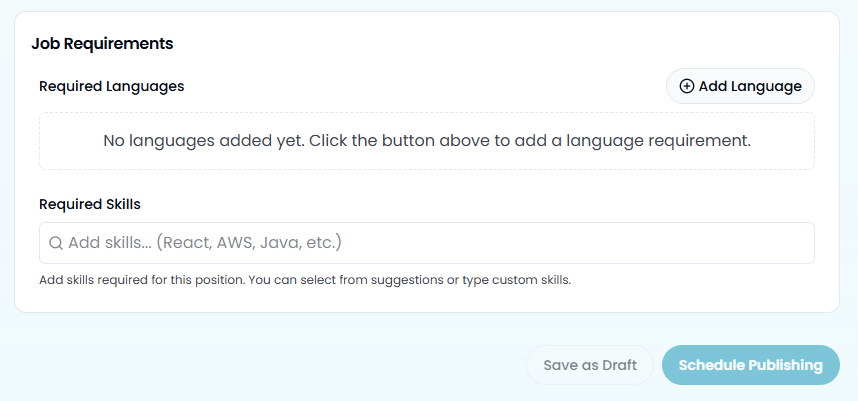
Add both required skills and preferred languages. Our system will show skill matching scores for each applicant, helping you quickly identify the best fits. You can:
- Select from suggested skills (React, AWS, Java, etc.)
- Add custom skills by typing and pressing Enter
- Set language requirements with minimum proficiency levels
Boosting Your Job Post (Optional)
For critical roles, consider our promotional features:
- Featured Listing: Your job appears highlighted at the top of search results for 30 days
- Premium Talent Matching: Our team personally matches top candidates to your role within 7 working days
These features are currently only available on-premise. If you are interested, please contact us at contact@bedevs.be
Managing Applications
Once your job is live, candidates will start applying. Here's how to manage the process effectively:
Application Review Process
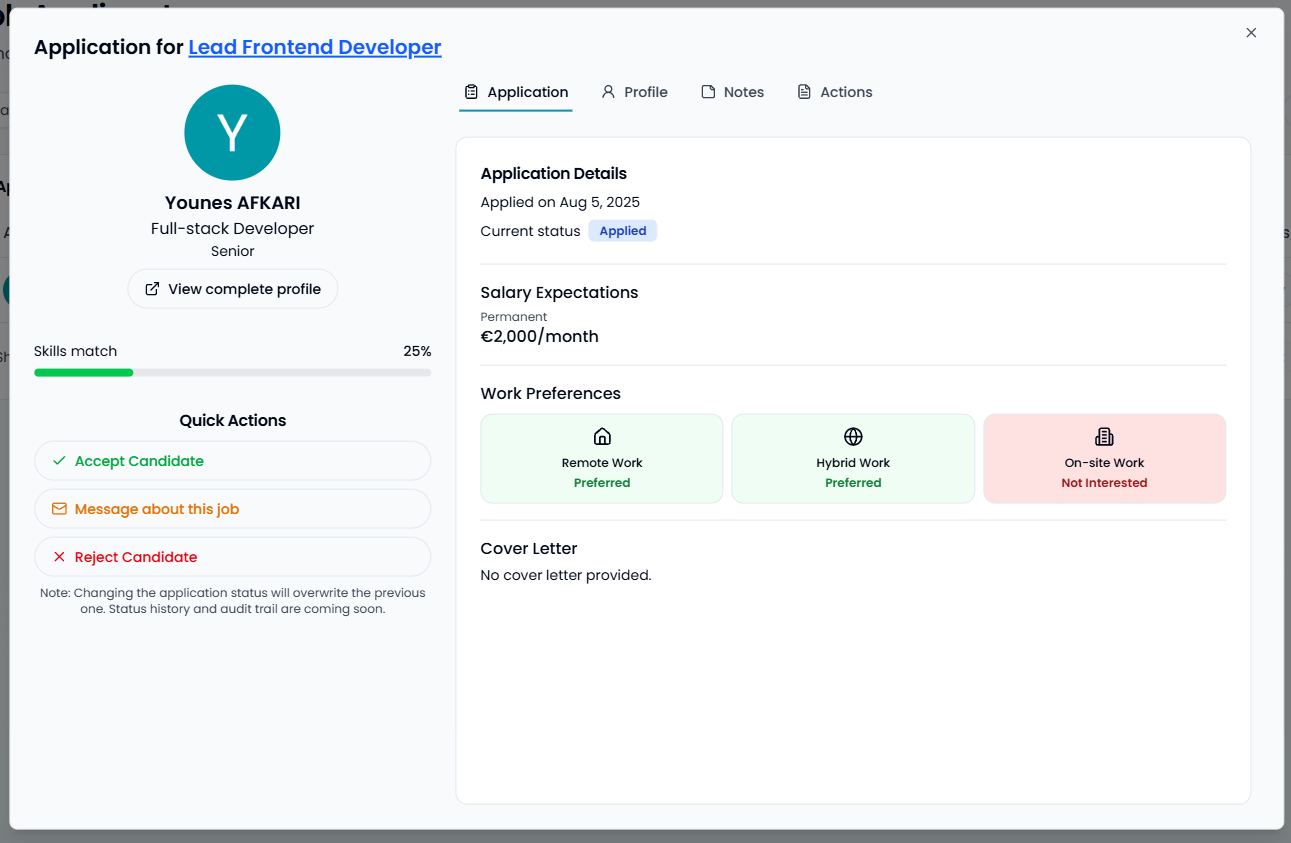
Each application shows:
- Matching Score: How well the candidate's skills align with your requirements
- Profile Summary: Quick overview of their experience and expertise
- Cover Letter: If provided by the candidate
- Application Status: Applied, Reviewing, Interviewed, Accepted, Rejected, or Archived
Important: Some candidates may not have listed all the skills you mentioned but might still have them. It’s always worth starting a conversation to see if there’s a good fit.
Quick Actions
For each candidate, you can:
- Accept: Start a conversation and mark them as a potential hire
- Reject: Politely decline with an optional message
- Message: Communicate directly about the opportunity
- Add Notes: Keep internal records about each candidate (These notes are not visible to the job seeker but are shared with other members of your organization.)
Communication Best Practices
When a candidate applies:
- Acknowledge promptly: Even a quick "We've received your application" goes a long way
- Be specific: If you're interested, explain the next steps clearly
- Stay professional: All communication reflects your company's brand
- Give feedback: Even rejections can be constructive and leave a positive impression. Thoughtful feedback helps build goodwill, strengthens your employer brand, and can lead to valuable word-of-mouth recommendations.
Analytics and Performance Tracking
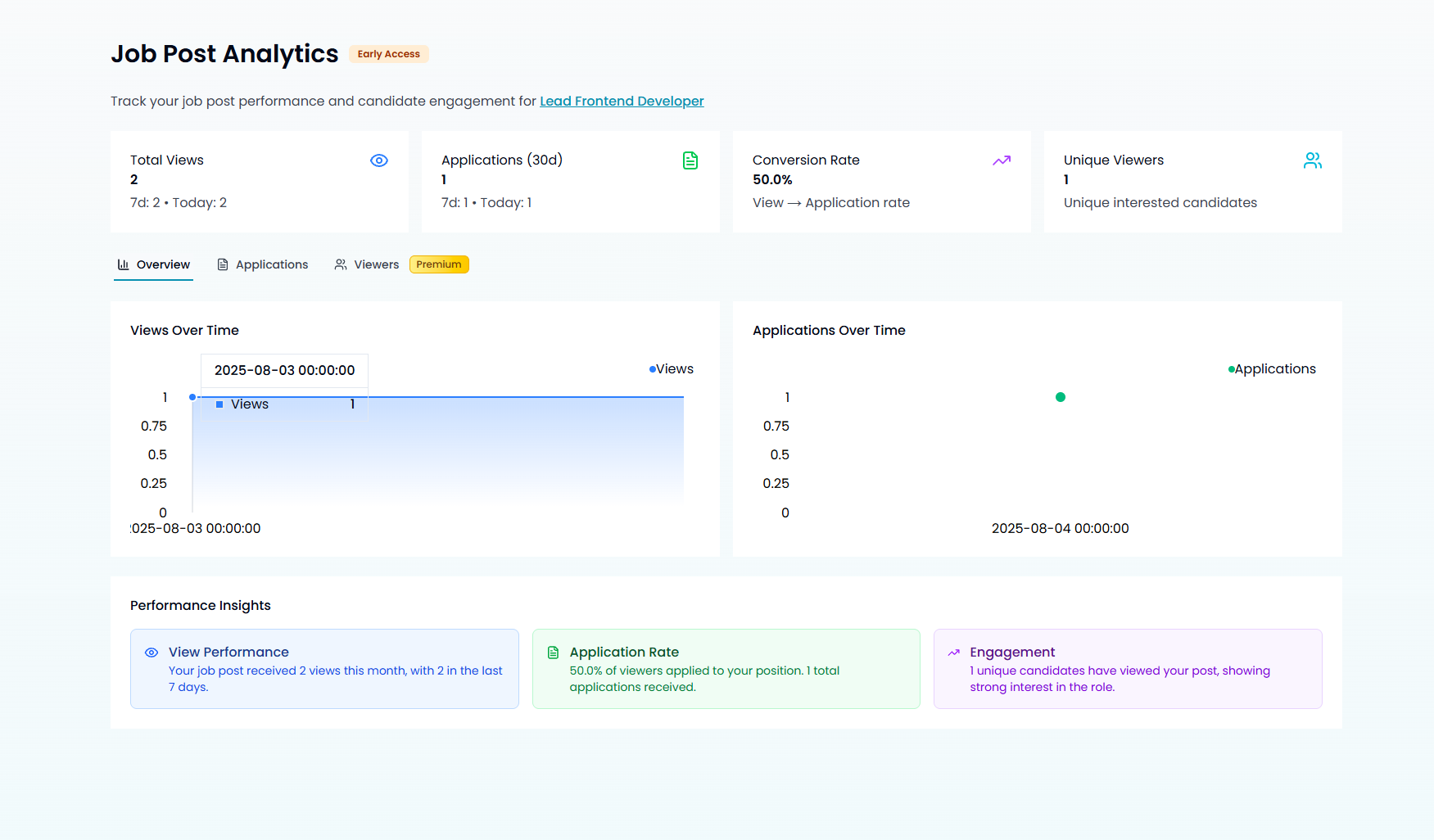
BeDevs provides detailed analytics to help you improve your recruiting:
- Job Views: How many views gathered your job post (If someone checked your offer multiple time in the same hour, it will count for one view.)
- Application Rate: Percentage of viewers who applied
- Top Performing Posts: Which roles attract the most quality candidates
- Unique candidate Count: How many people saw your job post
You'll also receive weekly and monthly email summaries showing your recruitment performance across all job posts. (You can disable these notifications in your Account Settings page.)
Getting Help
If you run into issues or have questions:
- Help Center: Browse our comprehensive guides and FAQs
- Support Team: Contact us at support@bedevs.be for personalized assistance
Next Steps
Now that you're set up:
- Complete your organization profile with compelling descriptions and visuals
- Post your first job with detailed requirements and transparent salary information
- Explore our analytics to understand what works best for your recruitment needs
Remember, the most successful recruiters on BeDevs are those who engage authentically with candidates, provide clear information about opportunities, and maintain professional communication throughout the hiring process.
Welcome to the BeDevs community - we're excited to help you find your next great hire!